

WhatsApp Beta for Android 2.25.17.7: Star Channel Updates Feature Explained
In this article, I’ll guide you through the exciting new feature in WhatsApp’s beta for Android version 2.25.17.7, released on May 19, 2026.
Discover how to star channel updates for easy access, making it simpler to keep track of important content in your favorite WhatsApp channels, perfect for gamers and tech enthusiasts staying updated on the go.
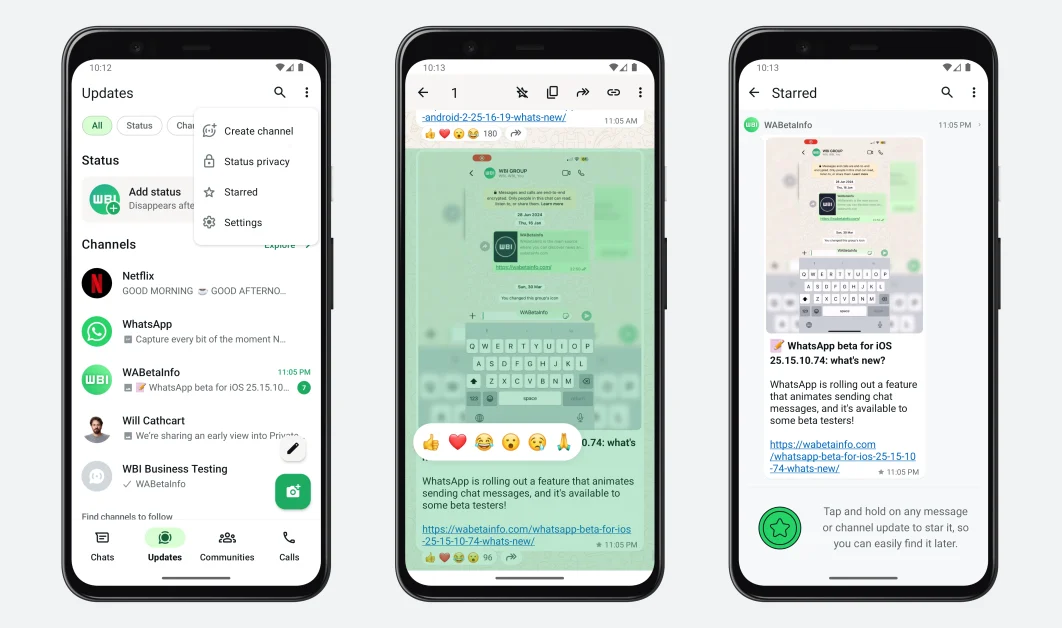
WhatsApp’s latest Android beta update (2.25.17.7) introduces a feature that lets users mark channel updates as starred, allowing quick access to important posts without scrolling through long histories. Available to some beta testers via the Google Play Beta Program, this update enhances content management for channels, ideal for tracking gaming news, tech announcements, or community updates. This guide covers how to use the feature, its benefits, and tips to stay ahead with WhatsApp’s evolving tools.
What’s New in WhatsApp Beta 2.25.17.7?
The standout feature in WhatsApp beta for Android 2.25.17.7 is the ability to star channel updates, rolling out to select beta testers as of May 19, 2026.
Initially announced in the WhatsApp beta 2.24.26.18 update, this feature is now live for public testing, letting users save specific channel posts for easy reference.
It’s a game-changer for organising content in channels, which are one-way broadcast tools for sharing updates with large audiences, like gaming clans or tech news outlets.
How the Starred Updates Feature Works?
Here’s how to use the starring feature:
- Open a Channel: Navigate to a WhatsApp channel you follow (found in the Updates tab).
- Select an Update: Tap and hold a specific post (e.g., a game patch note or tech product reveal).
- Star the Update: Press the star icon in the top app bar to mark the update as important.
- Access Starred Updates: Visit the channel’s info screen to view all starred updates in a dedicated list.
Why This Feature Matters?
The starred updates feature addresses a common pain point: finding important posts in busy channels. Here’s why it’s a big deal:
- Effortless Organization: Save critical updates, like esports schedules or tech launch dates, without screenshots or external apps.
- Time-Saving: Avoid scrolling through dozens of posts to locate a specific announcement.
- Enhanced Engagement: Perfect for gamers tracking patch notes or tech fans following product drops, ensuring you never miss key info.
- Privacy-Focused: Like all WhatsApp features, channel interactions remain end-to-end encrypted, keeping your starred updates secure.
For Gamers and Techies: Imagine following a channel for Genshin Impact updates. Star the post about a new character banner to quickly check event details later, or save a tech channel’s post about the Xiaomi 15S Pro launch for specs and pricing—all within WhatsApp.
How to Get the Feature?
To try the starred updates feature:
- Join the Beta Program: Enroll in the Google Play Beta Program for WhatsApp (search “WhatsApp beta” on the Play Store). Note: Beta slots are limited, so you may need to wait.
- Update to 2.25.17.7: Ensure your WhatsApp beta is updated to version 2.25.17.7 via the Play Store.
- Stable Version Option: The latest stable WhatsApp update (e.g., 2.25.16.8) may also support this feature for non-beta users, so check your app.
What’s Next for WhatsApp?
WhatsApp’s 2026 beta roadmap hints at more channel-focused features, like resharing status updates (beta 2.25.16.19) and AI-powered message summaries (beta 2.25.15.12), which could complement starred updates for better content management.
Expect broader rollout of the starring feature in stable updates by June 2026, based on current beta testing trends.
For now, the starred updates feature is a small but mighty addition, making WhatsApp a go-to hub for organized, real-time updates.
Whether you’re a gamer chasing esports news or a techie tracking gadget launches, this tool keeps you one tap away from what matters.
FAQs
What does the starred updates feature do?
It lets you mark specific WhatsApp channel posts as starred, saving them in a dedicated list in the channel info screen for easy access.
How do I get WhatsApp beta 2.25.17.7?
Join the Google Play Beta Program and update WhatsApp to version 2.25.17.7. Alternatively, check if version 2.25.17.6 or the latest stable update supports the feature.
Is the starred updates feature available for all users?
It’s currently limited to some beta testers on Android (version 2.25.17.7 or 2.25.17.6). A wider rollout is expected in coming weeks.
Can I star updates in group chats or personal chats?
No, this feature is exclusive to WhatsApp channels. However, future updates may expand similar tools to groups or chats, like threaded replies (beta 2.25.7.7).

IconicTechs Is A Problem-Solving Community Where We Provide Top-notch solutions to your Tech Problem.