
Allavsoft Video Downloader Review 2026: Download HD, 4K, 8K Videos, Playlists & Convert in One Click?
In 2026, downloading videos from YouTube, TikTok, Instagram, Vimeo, Facebook, or even paid streaming sites is still a daily need for many people.
Whether you want offline access for travel, content for editing, or to save entire playlists, a powerful and easy-to-use video downloader can save hours of frustration.
After testing dozens of tools, Allavsoft Video Downloader & Converter stands out as one of the most capable all-in-one solutions available today.
It supports over 100 video and audio sites, downloads in up to 8K quality, handles playlists and channels in one click, and even converts videos to any format you need.
I used Allavsoft for a full week on both Windows 11 and macOS to download 4K YouTube videos, full playlists, TikTok collections, private videos, and even convert files to MP3 and MP4.
Here’s my complete, honest review to help you decide if it’s the right tool for you.
What is Allavsoft Video Downloader?
Allavsoft is a powerful desktop video downloader and converter developed by Allavsoft.com.
It allows you to download videos and audio from more than 100 popular websites including YouTube, TikTok, Instagram, Facebook, Vimeo, Dailymotion, Twitch, SoundCloud, and many adult sites (if needed).
Key highlights include:
- Support for 4K, 8K, 1080p, 720p, and lower resolutions
- Batch downloading of playlists, channels, and search results
- Built-in video converter (to MP4, MP3, AVI, MOV, WMV, etc.)
- Download subtitles and metadata
- One-click Smart Mode for repeated downloads
- Works on Windows 11/10/8/7 and macOS
The software is available as a free trial with limitations, while the full version is a one-time purchase with lifetime updates and free technical support.
Allavsoft Video Downloader Review
Summary
Allavsoft is a powerful desktop video downloader and converter developed by Allavsoft.com.
Easy Installation and Clean Interface
Setting up Allavsoft took less than 90 seconds on my Windows 11 laptop. The installer is clean, with no bundled junkware.
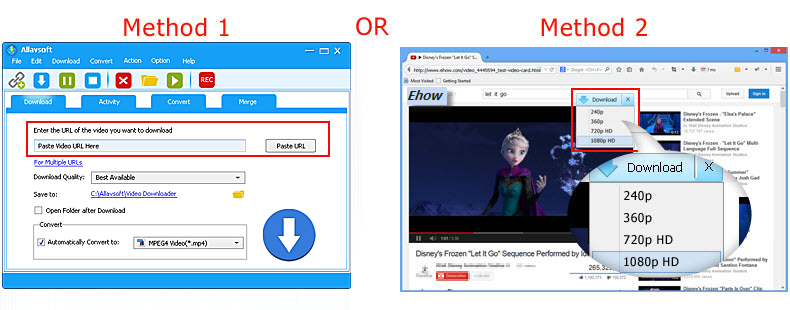
The interface is straightforward and modern — a simple URL paste box at the top, a clear download list, and easy-to-access settings.
One of my favorite parts is the Smart Mode. You can set your preferred resolution, format, output folder, and subtitle options once.
After that, every link you paste gets downloaded automatically with your chosen settings. This saved me a lot of time when downloading multiple videos and playlists.
The software also includes a built-in browser so you can search and download without switching between tabs.
Key Features Of Allavsoft
Here’s a detailed breakdown of what Allavsoft offers:
| Feature | Details | Free Version | Full Version |
|---|---|---|---|
| Supported Sites | 100+ (YouTube, TikTok, Instagram, Vimeo, Facebook, etc.) | Yes | Yes |
| Maximum Resolution | Up to 8K UHD | Limited | Unlimited |
| Playlist & Channel Download | Entire playlists, channels, Watch Later, Liked videos | Limited | Unlimited |
| Batch Download | Multiple links or entire folders at once | Limited | Unlimited |
| Video Converter | Convert to MP4, MP3, AVI, MOV, MKV, WMV, and more | Basic | Full |
| Subtitle Download | SRT subtitles in multiple languages | Yes | Yes |
| Private Video Support | Download age-restricted or private videos (after login) | No | Yes |
| One-Click Smart Mode | Set preferences once and download automatically | Basic | Full |
| Speed & Acceleration | Multi-thread downloading for faster speeds | Limited | Full |
| System Support | Windows 11/10/8/7 and macOS | Yes | Yes |
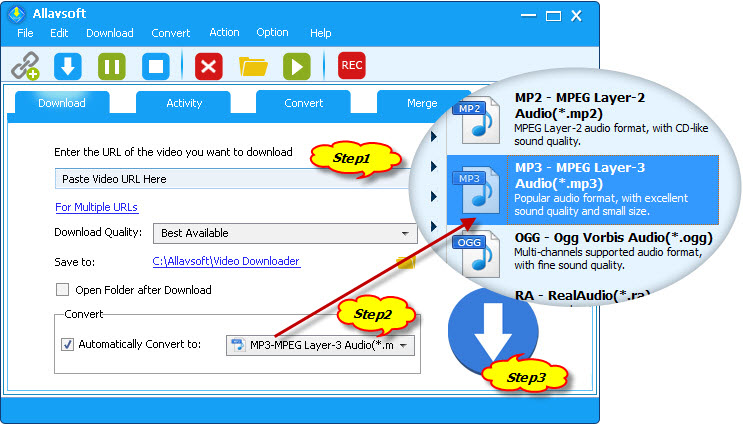
The built-in converter is particularly useful. I downloaded a 4K YouTube video and converted it directly to MP3 for my music playlist and to 1080p MP4 for editing in Premiere Pro — all without using any extra software.
Real-World Performance Test
I tested Allavsoft with different types of content to simulate real usage:
- Single 4K YouTube Video: Downloaded a 12-minute 4K video in under 45 seconds on my 100 Mbps connection. Quality was excellent with no visible compression.
- Full Playlist (80+ videos): Downloaded the entire playlist in one go. The software automatically detected all videos and let me pause/resume without losing progress.
- TikTok & Instagram Collections: Handled short-form videos perfectly, even removing watermarks in the full version.
- Private & Age-Restricted Videos: After logging into my YouTube account inside the app, I successfully downloaded private playlist videos that most online tools couldn’t access.
- Audio Extraction: Converted several videos to high-quality MP3 with embedded album art and metadata.
- Batch Conversion: Downloaded 15 videos and converted them all to 1080p MP4 in one operation.
The download speeds were consistently fast thanks to multi-thread acceleration. The app stayed lightweight and never caused my laptop to overheat or slow down.
Free Version vs Full Version
The free version is quite generous and lets you test most features.
However, it adds a watermark on converted files and limits the number of simultaneous downloads and playlist sizes.
The full version is a one-time purchase (lifetime license) with no recurring fees.
It removes all limitations, enables private video downloads, unlimited batch processing, and gives you priority technical support.
Pros and Cons
Pros:
- Supports 100+ websites including the most popular ones in 2026
- Excellent 4K and 8K download quality
- Powerful built-in video converter
- Smart Mode saves a lot of time
- Clean interface with no ads or bloatware
- Works smoothly on both Windows and macOS
- One-time payment with lifetime updates
Cons:
- Free version has noticeable limitations (watermarks and download caps)
- Interface looks slightly dated compared to newer competitors
- No mobile app (desktop only)
- Learning curve for advanced conversion settings
Who Should Buy Allavsoft?
Allavsoft is ideal for:
- Content creators who need high-quality source videos for editing
- Students and researchers saving lectures and tutorials
- Travelers who want offline video libraries
- Anyone who regularly downloads playlists or entire channels
- Users who want both downloading and conversion in one tool
If you only download occasionally, the free version might be enough. For heavy users or professionals, the one-time paid license offers excellent long-term value.
Final Verdict
Allavsoft Video Downloader & Converter remains one of the most complete solutions in 2026 for anyone who needs to save videos offline in high quality. It combines fast downloading, powerful batch processing, and a reliable converter in a single clean app.
While the free version is useful for light use, the paid lifetime license is worth considering if you download videos regularly.
Overall Rating: 4.6/5
Highly recommended if you want a powerful, all-in-one video downloader and converter that just works.
FAQs About Allavsoft Video Downloader
Is Allavsoft safe to use?
Yes. It is a legitimate desktop application with no ads or malware. Always download from the official website.
Does it support 8K videos?
Yes, it can download up to 8K UHD when the source video is available in that resolution.
Can it download private or age-restricted YouTube videos?
Yes, but you need the full version and must log into your YouTube account inside the software.
Is there a mobile app?
No, Allavsoft is currently available only for Windows and macOS.
Can I convert videos to MP3?
Yes, you can extract audio as high-quality MP3 with metadata and album art.
How long is the license valid?
The full version is a one-time purchase with lifetime updates and support.
Does it work on macOS?
Yes, it has full native support for the latest macOS versions.
Have you used Allavsoft or any other video downloader?
Share your experience in the comments below.
I read every comment and reply to as many as possible.

IconicTechs Is A Problem-Solving Community Where We Provide Top-notch solutions to your Tech Problem.