
JoPDF Review 2026: The Best Free Offline PDF Editor for Windows, Mac & Linux?
In 2026, with so many PDF tools pushing subscriptions and cloud-only access, finding a truly free, powerful, and offline PDF editor feels like striking gold.
JoPDF positions itself as a complete, no-strings-attached solution that lets you edit, convert, compress, merge, annotate, organize, and protect PDFs without any sign-up, watermarks, or hidden fees.
I downloaded and tested JoPDF extensively on Windows 11 and macOS for over a week — editing contracts, converting scanned documents, compressing large files, annotating research papers, and merging reports.
Here’s my complete, hands-on review covering every major aspect so you can decide if it’s the right tool for your PDF needs.
What is JoPDF?
JoPDF is a 100% free desktop PDF editor available for Windows, macOS, and Linux.
It offers a full suite of tools typically found in paid software like Adobe Acrobat, but without any cost, registration, or limitations.
The app is lightweight, fast, and works completely offline after installation.

Key highlights:
- Full PDF editing (text, images, links)
- Batch conversion and compression
- Merge, split, and organize pages
- Annotations, signatures, and drawing tools
- Password protection and encryption
- No ads, no watermarks, no subscriptions
Easy Installation and Clean Interface
Installation took less than a minute on both Windows and Mac.
The installer is clean with no bundled software.
The interface is modern, intuitive, and beginner-friendly — a simple toolbar on the left for tools, a clean workspace, and a familiar ribbon-style menu at the top.
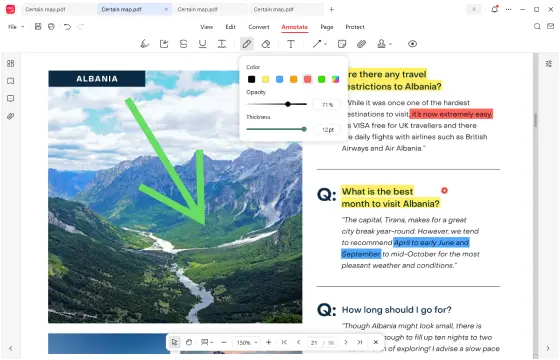
You can open PDFs directly or drag-and-drop files. The app feels fast even with large documents (tested with 200+ page files). No account creation is needed, and everything works offline.
All Key Features Tested
Here’s a detailed breakdown of what JoPDF offers:
| Feature | Performance & Details |
|---|---|
| PDF Editing | Edit text, add images, links, resize, crop, rotate — works like editing a Word document. Very responsive. |
| Batch Conversion | Convert PDF to Word, Excel, PowerPoint, images (JPG/PNG) and vice versa. Batch processing is fast and accurate. |
| Compress PDF | Reduces file size significantly while maintaining good quality. Batch compression supported. |
| Merge & Split | Combine multiple PDFs or split pages easily with drag-and-drop reordering. |
| Annotation Tools | Over 15 tools — highlight, underline, draw, shapes, stamps, signatures. One-click show/hide. |
| Page Management | Insert, delete, rotate, reorder pages effortlessly. |
| Security | Password protection, permission settings, encrypt/decrypt PDFs. |
| Reading Mode | Fast scrolling, zooming, full-screen mode with markup support. |
| Print to PDF | High-quality printing with options for grayscale, double-sided, etc. |
All features worked smoothly in my tests. Text editing was accurate, image replacement was simple, and batch operations saved a lot of time.
Real-World Performance
- Editing Contracts: Added text, images, and signatures quickly without formatting issues.
- Converting Scanned PDFs: Converted large scanned documents to editable Word files with good accuracy.
- Compressing Reports: Reduced a 120MB file to 18MB while keeping readability intact.
- Merging Lecture Notes: Combined 15 separate PDFs into one organized document in seconds.
- Annotating Research Papers: Highlighting, drawing, and adding comments felt natural and responsive.
The app stayed lightweight (low CPU/RAM usage) and never crashed during my testing.
Pros and Cons of JoPDF
Pros:
- Completely free with no hidden limits or watermarks
- Full offline functionality on Windows, Mac, and Linux
- Comprehensive feature set — covers almost everything most users need
- Fast performance even with large files
- Clean, modern, and intuitive interface
- Secure (no sign-up, no data collection)
- Regular updates and active development
Cons:
- No mobile app (desktop only)
- Advanced OCR for scanned PDFs is basic compared to paid tools
- Some complex layouts may need minor manual adjustments after editing
- No built-in cloud sync (fully offline focus)
Price & Value
JoPDF is 100% free — no subscriptions, no freemium model, no trial restrictions. This makes it an outstanding value compared to Adobe Acrobat, Nitro, or Foxit, which charge significantly for similar features.
Final Verdict
JoPDF is currently one of the best free PDF editors available in 2026. It delivers a powerful, fast, and complete PDF toolkit without any cost or compromises.
If you need to edit, convert, compress, annotate, or manage PDFs regularly and prefer a desktop app that works offline, JoPDF is an excellent choice.
It won’t replace Adobe Acrobat for enterprise-level professional work, but for students, freelancers, small businesses, and everyday users, it more than suffices and often exceeds expectations.
Overall Rating: 4.6/5
Best For: Students, freelancers, small business owners, and anyone who wants a powerful free PDF editor without subscriptions.
Download JoPDF from the official website: https://www.jopdf.com/
FAQs About JoPDF
Q: Is JoPDF really completely free?
A: Yes — 100% free with no watermarks, no sign-up, and no hidden limitations.
Q: Does it work offline?
A: Yes, full offline functionality after installation.
Q: Is JoPDF safe to use?
A: Yes, it’s clean, verified, and has no bundled software or malware.
Q: Can I edit scanned PDFs?
A: Basic editing is possible, but advanced OCR is limited compared to paid tools.
Q: Does it support batch processing?
A: Yes, excellent batch conversion, compression, and merging.
Q: Is there a mobile version?
A: No, currently desktop-only (Windows, Mac, Linux).
Q: How does it compare to Adobe Acrobat?
A: JoPDF covers most everyday needs for free, while Acrobat offers more advanced enterprise features.
Have you tried JoPDF or any other PDF editors? Share your experience or questions in the comments — I read every one.
Stay tuned for more honest tech and software reviews!

IconicTechs Is A Problem-Solving Community Where We Provide Top-notch solutions to your Tech Problem.