
BenQ PV3200U Review: A Creator’s Dream 4K Monitor in 2026
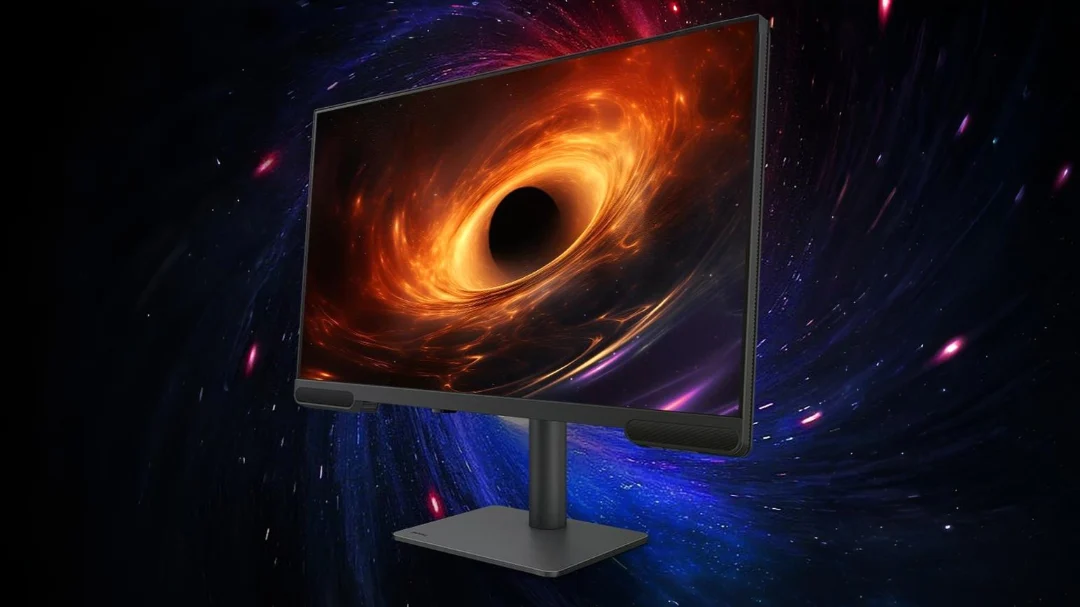
If you’re a video editor, YouTuber, or creative professional hunting for a monitor that blends stunning visuals with practical features, the BenQ PV3200U 32” 4K Monitor might catch your eye.
Launched in China in July 2026 for around 4,999 yuan ($680 USD), this monitor is built for video creators, boasting a 4K IPS panel, 95% DCI-P3 color coverage, and unique tools like iDevice Color Sync.
With built-in 2.1ch speakers and a Wireless Hotkey Puck, it’s designed to streamline your workflow.
But is it worth the price?
Let’s Understand!!
What Makes the BenQ PV3200U Stand Out?
The BenQ PV3200U is tailored for content creators, particularly those producing videos for platforms like YouTube and Vimeo.
Its 32-inch 4K UHD (3840×2160) IPS panel delivers sharp, vibrant visuals, while features like factory-calibrated colors and a KVM switch cater to professionals juggling multiple devices.
Available on JD.com, it’s positioned as a mid-range powerhouse with creator-focused perks.
Let’s dive into its key features and real-world performance.
Key Features at a Glance
- 4K UHD IPS Panel: 32-inch display with 3840×2160 resolution and 140 PPI for crisp visuals.
- Color Accuracy: 95% DCI-P3, 100% Rec.709, and Delta E ≤ 3 for precise colors.
- Built-in 2.1ch Speakers: Clear audio for editing and casual playback.
- Wireless Hotkey Puck: Quick switching between color modes (sRGB, Rec.709, DCI-P3).
- iDevice Color Sync: Preview how colors appear on iPhones/iPads before export.
- Connectivity: USB-C (90W power delivery), HDMI 2.0, DisplayPort 1.4, USB-A hub, headphone jack.
- HDR Support: VESA DisplayHDR 400 for enhanced contrast.
- Ergonomic Design: Adjustable stand with height, tilt, and swivel.
Hands-On Experience: How Does It Perform?
Display Quality
The 32-inch 4K IPS panel is a standout, offering crystal-clear visuals with a 140 PPI pixel density.
Whether I was editing 4K footage in DaVinci Resolve or tweaking photos in Photoshop, the display delivered sharp details and vibrant colors.
The 95% DCI-P3 and 100% Rec.709 coverage, paired with a Delta E ≤ 3, ensure colors are accurate right out of the box—crucial for video editors.
The 350-nit brightness (400 nits in HDR mode) handles most indoor settings well, but some users note it can feel dim in very bright rooms.
The VESA DisplayHDR 400 certification adds decent contrast, though it’s not as dynamic as higher-end HDR monitors like the ASUS ProArt PA32UCG.
Creator Features: Workflow Boosters
The PV3200U is packed with tools to make editing easier.
The Wireless Hotkey Puck lets you switch color modes with a single tap, saving time when toggling between sRGB, Rec.709, or DCI-P3 for different projects.
The iDevice Color Sync feature is a gem for YouTubers, letting you preview how your video will look on an iPhone or iPad before uploading—ensuring no color surprises on mobile devices.
I tested this with a short clip, and the preview matched my iPhone’s display closely, though setup on Windows took some fiddling with BenQ’s Display Pilot software.
The factory-calibrated panel with AQCOLOR technology delivers consistent colors, making it a reliable choice for professional work.
Audio
Unlike most monitors, the PV3200U includes 2.1ch speakers, which produce clear, robust sound for a monitor.
During testing, dialogue in videos and music tracks sounded crisp, with enough bass for casual use.
They’re not studio-grade, but they’re a great space-saver for creators who don’t want extra speakers on their desk.
Some users mention the volume isn’t loud enough for larger rooms, so a headset might still be needed for critical audio editing.
Ergonomics and Build
The PV3200U’s sleek design fits well in a professional workspace. Its adjustable stand offers height, tilt, and swivel options, making it easy to find a comfortable viewing angle during long editing sessions.
The anti-glare coating worked well near a window, reducing reflections. At 32 inches, it’s large but not desk-hogging, though some users note the stand’s footprint is bigger than expected.
The build feels solid, but the plastic frame isn’t as premium as higher-end models like the Apple Studio Display.
Connectivity
The monitor offers a USB-C port with 90W power delivery, HDMI 2.0, DisplayPort 1.4, a USB-A hub, and a headphone jack.
I connected my MacBook Air via USB-C, and it handled 4K visuals and charging without a hitch.
The KVM switch is a productivity booster, letting you control two devices (e.g., a Mac and PC) with one keyboard and mouse.
However, the lack of HDMI 2.1 or Thunderbolt 4 means it’s not as future-proof as the BenQ PD3226G, which supports 144Hz and Thunderbolt 4.
Drawbacks
The 60Hz refresh rate and 4ms response time are fine for video editing but limit its appeal for gaming or motion-heavy animation work.
Competitive gamers might prefer the BenQ Mobiuz EX321UX (144Hz, Mini LED). The 350-400 nit brightness is adequate but may struggle in bright environments.
Lastly, the iDevice Color Sync setup can be clunky on non-Mac systems, requiring extra software tweaks.
Pros and Cons
Pros
- Stunning 4K IPS display with 95% DCI-P3 and 100% Rec.709.
- Factory-calibrated colors with Delta E ≤ 3 for professional accuracy.
- Wireless Hotkey Puck and iDevice Color Sync streamline workflows.
- Built-in 2.1ch speakers save desk space.
- Ergonomic stand with anti-glare coating for comfort.
- Affordable at ~$680 for creator-focused features.
Cons
- 60Hz refresh rate not ideal for gaming or motion graphics.
- Brightness (350-400 nits) may feel dim in bright rooms.
- No HDMI 2.1 or Thunderbolt 4 for future-proofing.
- Large stand footprint may crowd smaller desks.
How Does It Compare?
- BenQ PD3200U (~$600): Similar 32” 4K IPS panel with 100% Rec.709 and sRGB but lacks the PV3200U’s speakers and iDevice Color Sync. A budget-friendly alternative for non-audio needs.
- BenQ MA320U (~$550): Mac-optimized with 97% DCI-P3 and dual USB-C, but no built-in speakers or Hotkey Puck. Great for Mac users on a tighter budget.
- ASUS ProArt PA32UCG (~$2,500): Superior HDR (1600 nits, HDR1400) and 120Hz refresh rate, but at a premium price. Best for high-end creators.
- Apple Studio Display (~$1,499): Premium build and 5K resolution, but overpriced for similar color accuracy and fewer ports.
The PV3200U offers a strong balance of price and features, making it a sweet spot for creators who don’t need ultra-high-end specs.
Who Should Buy the BenQ PV3200U?
This monitor is perfect for:
- Video Editors and YouTubers: 95% DCI-P3, iDevice Color Sync, and Hotkey Puck ensure accurate, efficient editing.
- Creative Professionals: Factory calibration suits photo editing and graphic design.
- Mac Users: Seamless USB-C integration and Mac-friendly color modes.
- Budget-Conscious Creators: Premium features at a mid-range price.
BenQ PV3200U Review
Summary
The BenQ PV3200U is a fantastic value for video creators and YouTubers at ~$680.
Its 32-inch 4K IPS panel delivers sharp, color-accurate visuals, while features like the Wireless Hotkey Puck and iDevice Color Sync make editing a breeze.
If you need a higher refresh rate or brighter HDR, consider the BenQ PD3226G or ASUS ProArt models.
FAQs About the BenQ PV3200U
Is it good for video editing?
Yes, with 95% DCI-P3, 100% Rec.709, and iDevice Color Sync, it’s ideal for video editing and mobile previews.
Can it handle gaming?
It’s okay for casual gaming, but the 60Hz refresh rate and 4ms response time aren’t suited for competitive titles.
How’s the audio quality?
The 2.1ch speakers are clear for casual use and editing but not loud enough for large rooms.
Is it Mac-compatible?
Yes, USB-C (90W) and iDevice Color Sync make it a great fit for MacBooks.
What’s the stand like?
Adjustable for height, tilt, and swivel, but the footprint may be large for small desks.
What’s the warranty?
Typically 3 years from BenQ, but confirm with retailers like JD.com.
Final Verdict: Is the BenQ PV3200U Worth It?
The BenQ PV3200U is a fantastic value for video creators and YouTubers at ~$680. Its 32-inch 4K IPS panel delivers sharp, color-accurate visuals, while features like the Wireless Hotkey Puck and iDevice Color Sync make editing a breeze.
The built-in 2.1ch speakers are a practical touch, and the ergonomic design ensures comfort during long sessions.
While the 60Hz refresh rate and modest HDR limit its versatility for gaming or high-end grading, it’s a top pick for budget-conscious creators who need reliable performance.
If you’re looking to elevate your video editing setup without splurging, the PV3200U is a no-brainer.
Where to Buy: Available on JD.com, BenQ’s official site, or Amazon India.
Look for launch deals to save up to 10%.

IconicTechs Is A Problem-Solving Community Where We Provide Top-notch solutions to your Tech Problem.