
How to Recover Deleted Photos from Camera?
I formatted the SD card.
I was too quick to think and read the warning, that all the photos will be deleted. I actually know this, but I was kind of desperate to solve this issue, so I just hit “OK” without really reading, which I totally regret in hindsight.
The camera works now, but the photos are all gone. Now I wondered, if there’s any chance I can get those deleted photos back? — From a Reddit user
If you accidentally delete the photographs on your digital camera, it will be such a pain especially if the pictures are one-of-a-kind.
A good number of people might first resort to the built-in recovery features of the system or the free photo recovery software but the outcome is usually not fruitful.
Moreover, the common recovery techniques often result in problems such as file corruption or failed scans.
Actually, there is a very easy and safe method to get back your lost pictures from the camera in a very efficient manner.
You are going to need professional photo recovery software in order to fetch deleted photos without overwriting the original data or having to follow complicated steps.
The good thing is that the recovery process doesn’t require any technical skills. I will be introducing a professional camera photo recovery tool that is user-friendly, trustworthy, and safe on this post. Let’s begin with it.
3 Essential Tips to Boost Camera Photo Recovery Success Rate
Before successfully recovering photos from your camera, you must verify the following prerequisites. It is only by doing the steps properly that you will be able to fully recover your pictures:
Immediately stop using the memory card: The most critical principle in data recovery is preventing overwriting. Continuing to shoot, save, or delete files may permanently erase original data.
Ensure the memory card has no physical damage: Data recovery requires the computer to correctly recognize the storage device. If the card slot is damaged or the memory chip is faulty, hardware repair must be performed first.
You can connect the memory card to your computer via a card reader to check if it can be recognized and accessed.
Install and operate professional recovery software: Recovery by means of a DIY method or the usage of a non-trustworthy software could further provoke file corruption. The best solution is to choose a camera-oriented photo recovery tool like RecoveryFox AI that can perform a deep-level analysis of camera formats such as RAW, RW2, and ARW.

Top Photo Recovery Solution for Windows Users
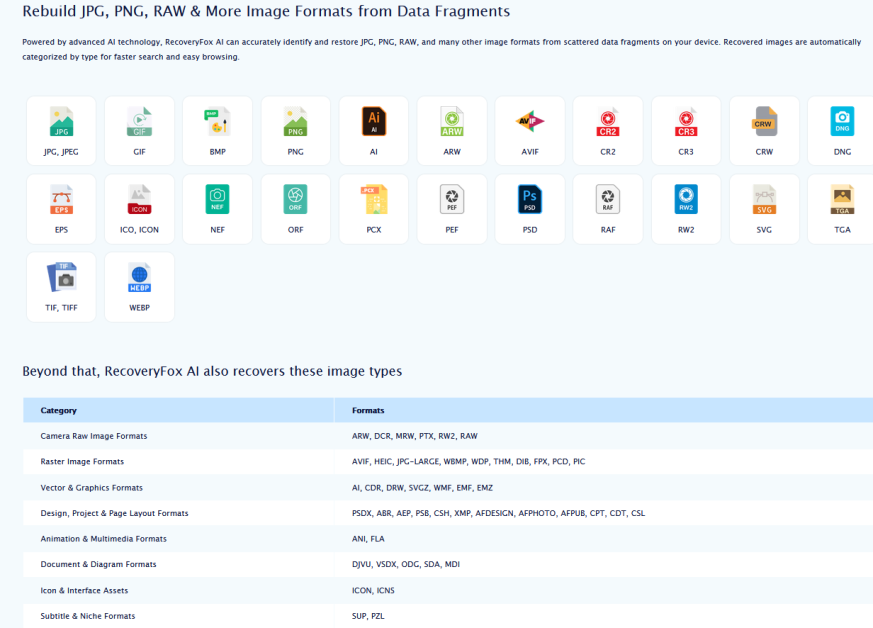
To effectively recover lost camera photos, choosing the right tool is crucial. To help you get started, we’ve compiled a powerful camera photo recovery program for Windows computers. It features an AI-powered scanning mode that scans and recovers JPG, PNG, RAW, and many other image formats from scattered data fragments on your device.
RecoveryFox AI is an all-encompassing data recovery solution that provides a lot more than just file recovery.
Users are able to take advantage of the strong software to retrieve images, videos, and other critical documents from different storage devices and different data loss situations.
RecoveryFox AI not only supports recovering deleted files in Windows 11 but is also optimized for AI-powered deep scanning of camera files. This enables it to effortlessly and swiftly detect and recover professional image formats like RAW, DCR, and PTX.
More About RecoveryFox AI
| Attribute | Description |
| Compatibility | Supports Windows 11/10/8.1/8/7/Vista、Windows Server 2022/2019/2016/2012/2008/2003 |
| File System | NTFS, exFAT, and FAT32 |
| File Formats | 500+ |
| Interface | Clean and intuitive, easy for beginners to master |
| Recovery Success Rate | 98% |
| Powerful Data Recovery Features | ● Deep recovery for various data loss scenarios.● Retrieves accidentally deleted files.● Recovers formatted hard drives while preserving folder structure.● Recovers lost data from USB drives, memory cards, or other external devices.● Recovers deleted files from the Recycle Bin. |
RecoveryFox AI Pricing
RecoveryFox AI comes with several licensing options, designed for casual users, professionals, and IT experts. Understanding the available plans will help you choose the version that best suits your data recovery needs.
There are 4 pricing plans for RecoveryFox AI: a weekly plan for $49.95, a monthly plan for $59.95, an annual plan for $69.95, and a lifetime plan for $99.95.
Fortunately, for IconicTechs readers, they have provided an exclusive coupon code that applies to all RecoveryFox AI plans: use “ICONICTECH10” to get a 10% discount at checkout.
Ready to recover your lost files? Try RecoveryFox AI today and explore its advanced features.

Coupon Code For RecoveryFOX A: IconicTech10
How to Recover Deleted Photos from Camera?
If you want to recover accidentally deleted photos from your digital camera, the best option is to use professional photo recovery software. Such software is capable of going through the storage device structures in a very detailed manner and getting back pictures that were deleted, thus making the recovery process absolutely lossless.
Here is the procedure to use camera photo recovery software on a Windows PC:
Step 1. Install and launch RecoveryFox AI on your computer.
Step 2. Connect the camera’s memory card to your computer via a card reader. As soon as it is connected, the software will recognize it without delay.
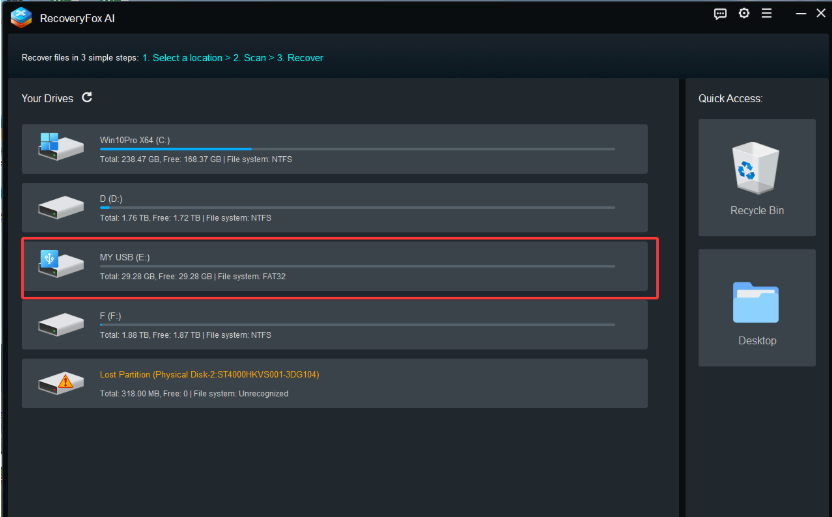
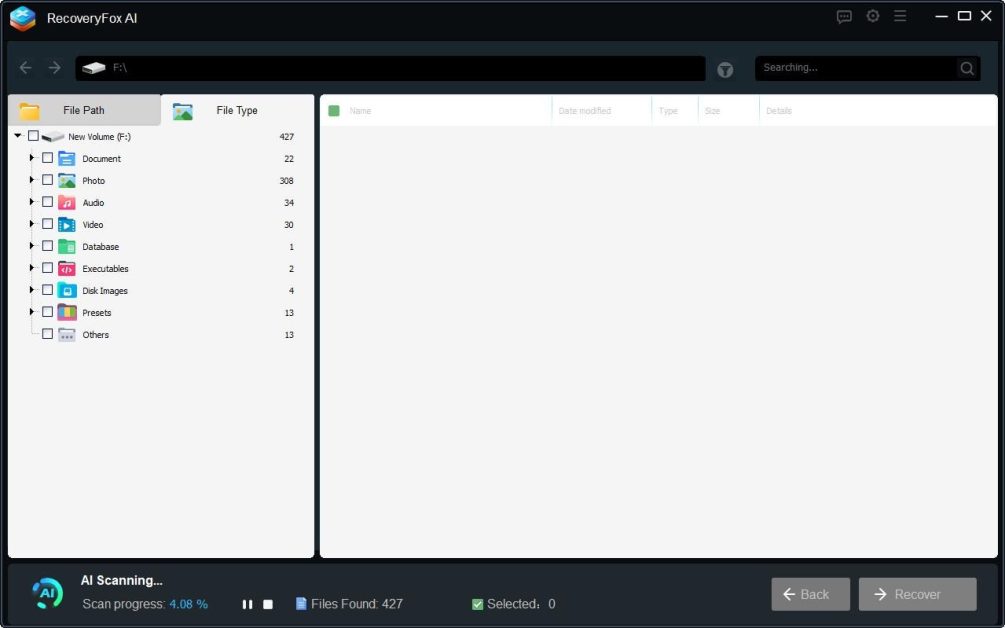
Step 3. Select your camera’s memory card and then click on the “Click to Scan” option. RecoveryFox AI will start scanning your device all by itself.
Scanning time may range from a few minutes to several hours, depending primarily on the drive capacity and number of files.
Also, if you want to see the files that have been found beforehand, you can interrupt or stop the AI scan at any time.
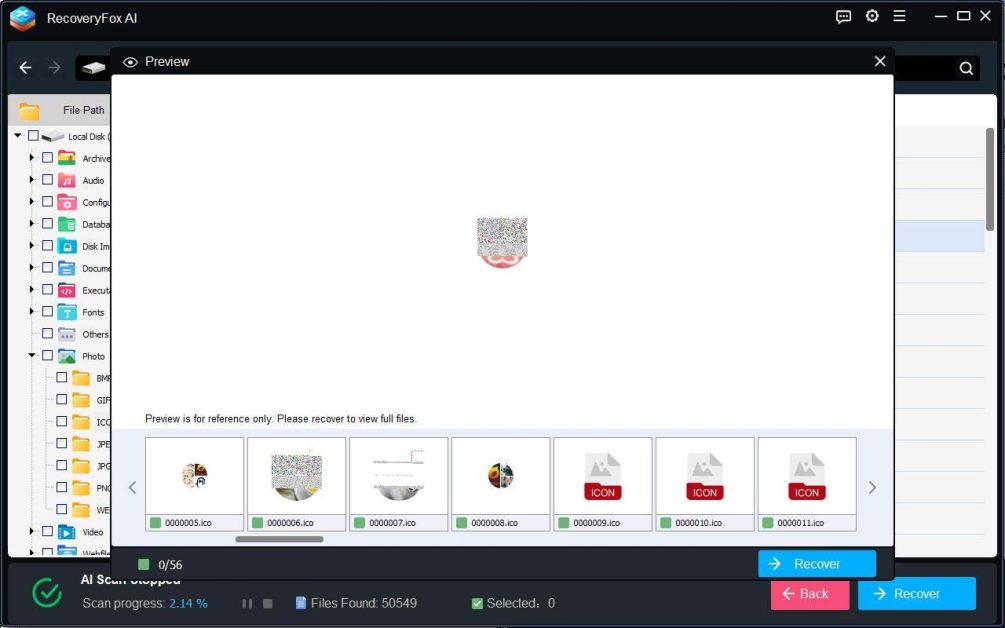
Step 4. After scanning is complete, you can right-click any image to preview it and select the images you want to recover.
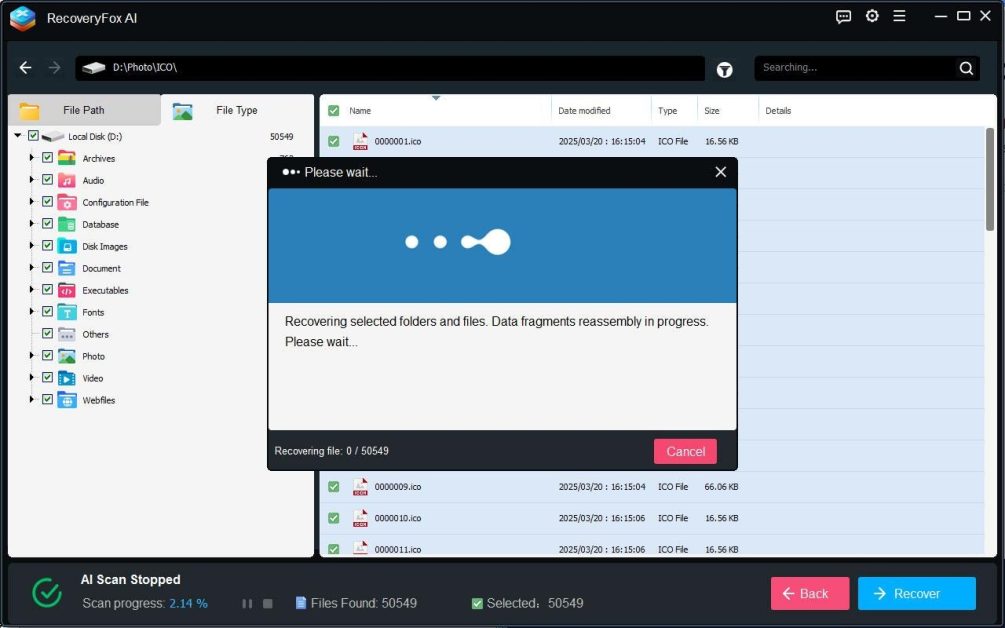
Step 5. Click the “Recover” button and select a secure save location (do not save to the original memory card).
FAQs
Q1: What causes photos to be lost from a camera?
Photos usually stop to exist when a photo file is accidentally deleted, a memory card is formatted, a storage device is damaged, or wrong handling of the file transfer process takes place. Sometimes, damage to the memory card can also make photos unreachable.
Q2: Can I recover deleted photos from a Canon camera?
Absolutely! RecoveryFox AI is a tool by which one can easily accomplish a photo recovery task in a Canon camera. The AI scanning mode of RecoveryFox AI is very effective and thoroughly searches your memory card to get back your photos.
Q3: How do I recover permanently deleted photos?
Even if you permanently deleted them or formatted the card, you can still try getting them back with RecoveryFox AI. Just don’t save anything new to the card before you try to recover them—that’ll give you the best chance.
Conclusion
When it comes to the rescue of once unforgettable moments, recovering the images you deleted from the camera is the most vital move.
Essentially, it boils down to three major things: being well-equipped for usage of the storage media, picking up a suitable recovery instrument, and above all, maintaining security and trustworthiness the whole way through.
Use the steps provided in this article, and with the help of a reliable program like RecoveryFox AI, it’s easy to retrieve any lost, deleted or formatted images.

IconicTechs Is A Problem-Solving Community Where We Provide Top-notch solutions to your Tech Problem.