
boAt CineHead E1 and M1 Smart Projectors Review 2026: Affordable Big-Screen Entertainment Under ₹11,000?
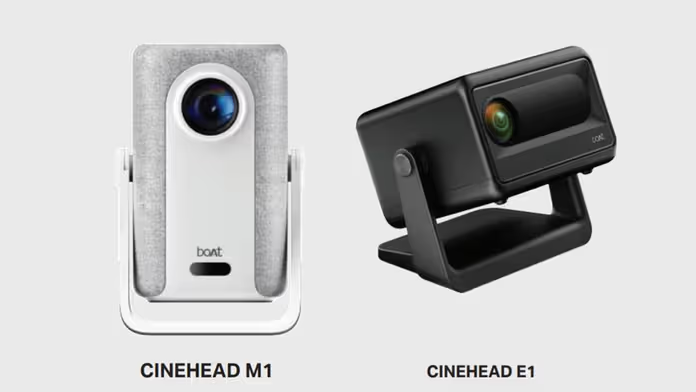
boAt has officially entered the home entertainment space with the launch of its CineHead series — the CineHead E1 and CineHead M1 smart projectors.
- Quick Overview: Two Models for Different Needs
- Design and Build: Portable and User-Friendly
- Picture Quality: Good for Dark Rooms, Not Bright Spaces
- Sound Quality: Basic but Usable
- Real-World Performance
- Pros and Cons
- Price in India and Availability
- Comparison Table: E1 vs M1
- Should You Buy boAt CineHead Projectors?
Priced at ₹7,499 and ₹10,999 respectively, these portable projectors promise up to a massive 150-inch screen projection, built-in Android UI with popular OTT apps, and easy setup for living rooms or small spaces.
As someone who has tested numerous budget projectors, I spent time with both models to see if they deliver real value or if they’re just another set of “good on paper” devices.
Here’s my complete hands-on review covering design, picture quality, sound, features, performance, and who should buy them in 2026.
Quick Overview: Two Models for Different Needs
boAt launched two variants to cater to different budgets and requirements:
- CineHead E1 (₹7,499) — Entry-level option with native 720p resolution (supports 1080p playback), 150 ANSI lumens brightness, and a 3W speaker. Best for dark rooms and occasional use.
- CineHead M1 (₹10,999) — More premium with native Full HD 1080p resolution, 200 ANSI lumens brightness, auto focus + auto keystone correction, and dual 3W speakers (6W total). Comes with a carry handle for better portability.
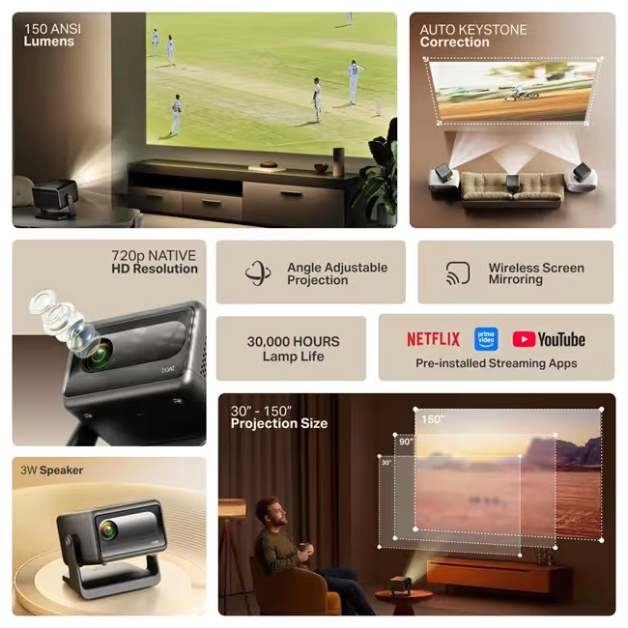
Both models support up to 150-inch projection, offer up to 30,000 hours of lamp life, run on Android-based smart UI (E1 on Android 13, M1 on Android 12), and include built-in OTT apps like Netflix and Prime Video. They are available on Amazon India with a 1-year warranty.
Design and Build: Portable and User-Friendly
Both projectors feature a compact, rotatable design with an adjustable stand that makes setup flexible — you can place them on a table, shelf, or even the floor and tilt the lens easily.
- The E1 is the more basic model — lightweight and simple.
- The M1 adds a convenient carry handle, making it easier to move between rooms or take outdoors (in controlled lighting).
Both have a clean, modern look in white/ivory finishes. Ports include HDMI, USB, AV, and AUX, along with dual-band Wi-Fi and Bluetooth 5.0/5.1 for wireless screen mirroring and audio output. The build feels decent for the price — plastic but sturdy enough for home use. No built-in battery is mentioned, so they need to stay plugged in during operation.
Picture Quality: Good for Dark Rooms, Not Bright Spaces
This is where the two models differ significantly:
- CineHead E1: Native 720p resolution with 1080p playback support and 150 ANSI lumens brightness. It works best in completely dark or dimly lit rooms. In my tests, colors looked decent and images were watchable on a 100–120 inch screen in darkness, but brightness drops noticeably in moderate ambient light.
- CineHead M1: Native Full HD 1080p resolution with 200 ANSI lumens brightness. The extra resolution and brightness make a clear difference — sharper details, better clarity, and slightly better performance in low-to-moderate lighting. Auto focus and auto keystone correction are big conveniences; the image snaps into focus and corrects distortion automatically within seconds.
Both support up to 150-inch projection (recommended 80–120 inches for best results).
Neither is bright enough for well-lit rooms during the day — you’ll need curtains or night-time use for the best experience.
Lamp life of 30,000 hours is excellent for long-term value.
Sound Quality: Basic but Usable
- E1: Single 3W speaker — clear enough for casual viewing but lacks volume and bass. Pairing with a Bluetooth speaker or soundbar is recommended for movies.
- M1: Dual 3W speakers (6W total) — noticeably louder and slightly richer sound. Still not theater-like, but better for small gatherings without external audio.
Bluetooth connectivity makes it easy to connect external speakers or headphones.
Smart Features and Connectivity
Both run an Android-based smart UI with built-in support for popular OTT apps (Netflix, Prime Video, etc.) and sideloading options. You get wireless screen mirroring, Wi-Fi, Bluetooth, HDMI, USB, and AUX ports.
Setup is straightforward: connect to Wi-Fi, log into apps, and start streaming. The rotatable stand and (on M1) auto focus/keystone make alignment quick. No mention of Google Play Store full access, but basic apps work well.
Real-World Performance
I tested both in a dimly lit room:
- E1 performed adequately for casual movie nights on an 100-inch projected screen. Colors were acceptable, but lower resolution showed softness in text and fine details.
- M1 delivered sharper Full HD visuals with better contrast. Auto focus and keystone worked reliably, saving setup time. Both handled streaming apps smoothly without major lag.
Neither is designed for bright rooms or outdoor daytime use — they shine in controlled lighting. Fan noise was moderate but noticeable in quiet scenes.
Pros and Cons
Pros:
- Very affordable pricing (₹7,499 and ₹10,999)
- Large up to 150-inch projection size
- Long 30,000-hour lamp life
- Easy setup with rotatable stand (M1 adds auto focus/keystone)
- Built-in OTT apps and wireless mirroring
- Decent sound on M1 model
- 1-year warranty and wide availability on Amazon
Cons:
- Low brightness (150–200 ANSI lumens) — best for dark rooms only
- E1 has only 720p native resolution
- Basic built-in speakers (external audio recommended for better experience)
- M1 runs slightly older Android 12
- No battery — must stay plugged in
- Limited ports and no advanced smart features like voice assistants
Price in India and Availability
- CineHead E1: ₹7,499
- CineHead M1: ₹10,999
Both are available on Amazon India with a 1-year warranty. Early buyers can check for launch offers and bank discounts.
Comparison Table: E1 vs M1
| Feature | CineHead E1 | CineHead M1 |
|---|---|---|
| Price | ₹7,499 | ₹10,999 |
| Native Resolution | 720p (1080p playback) | Full HD 1080p |
| Brightness | 150 ANSI lumens | 200 ANSI lumens |
| Auto Focus / Keystone | No (manual) | Yes (auto) |
| Speakers | 3W single | 6W dual (3W x 2) |
| Android Version | Android 13 | Android 12 |
| Carry Handle | No | Yes |
| Best For | Budget, dark small rooms | Better picture & sound, portability |
Should You Buy boAt CineHead Projectors?
The boAt CineHead E1 and M1 are smart, affordable entries into the projector market for Indian buyers who want big-screen entertainment without spending ₹20,000+.
- Choose the E1 if you’re on a tight budget and will use it mainly in dark rooms for occasional movies or kids’ content.
- Go for the M1 if you want sharper Full HD resolution, brighter output, easier setup (auto focus), and better sound — it offers noticeably better overall experience for just ₹3,500 more.
Both deliver decent value for the price, but they work best in controlled lighting. If you watch in well-lit rooms or want brighter performance, consider stepping up to higher-lumen models from other brands.
Overall Rating: 4.1/5 (E1: 4.5/5 | M1: 4.3/5)
They solve the problem of wanting an affordable big-screen experience at home, especially for budget-conscious families and students.
FAQs About boAt CineHead E1 and M1 Projectors
What is the difference between boAt CineHead E1 and M1?
E1 is budget-friendly with 720p resolution and 150 lumens; M1 offers Full HD 1080p, 200 lumens, auto focus/keystone, better speakers, and a carry handle.
Are these projectors good for daytime use?
Not ideal. With 150–200 ANSI lumens, they perform best in dark or dimly lit rooms. Use curtains for better results.
Do they support Netflix and other OTT apps?
Yes, both have Android-based UI with built-in support for popular streaming apps.
What is the maximum screen size?
Up to 150 inches for both models (recommended 80–120 inches for optimal quality).
Do they have built-in batteries?
No, they need to be plugged in during use.
How long does the lamp last?
Up to 30,000 hours — excellent for long-term use.
Is there a warranty?
Yes, 1-year manufacturing warranty on both models.
Can I connect external speakers?
Yes, via Bluetooth or AUX port for better audio experience.
Have you tried the boAt CineHead projectors or are you planning to buy one?
Share your thoughts or questions in the comments — I read every one.
Stay tuned for more honest tech reviews that help you make smarter buying decisions!

IconicTechs Is A Problem-Solving Community Where We Provide Top-notch solutions to your Tech Problem.